Database definition: export and load
A .pgdef file is a deterministic export of a database's schema definition (no data).
Loading it against a database diffs it with that database's catalogs and generates the DDL script that brings the
database to the file.
What it is good for
Schema migration between environments, cloning a schema into an empty database, keeping the schema in version
control (stable order, clean diffs), and comparing two states. For data, use pg_dump or
export a result.
Exporting a definition
With the tree cursor on a database row:
(also in the F2 menu); name a .pgdef file.
- The catalogs are read through a session of its own, in one
READ ONLY,REPEATABLE READtransaction (one snapshot), with an emptysearch_path, so every deparsed name is schema-qualified. - Always the whole database: all schemas except
pg_catalog,information_schema,pg_toast, temporary schemas and schemas created by an extension. No options. - Reading and writing run in the background; the status line reports Definition of adventureworks exported to ….
The .pgdef file
Pretty-printed JSON:
{
  "format": 1,
  "schemas": [
    {
      "name": "sales",
      "tables": [
        {
          "name": "customer",
          "columns": [
            {
              "name": "customerid",
              "type": "integer",
              "not_null": true
            },
            {
              "name": "createdby",
              "type": "text",
              "not_null": true,
              "default": "CURRENT_USER"
            }
          ],
          "constraints": [
            {
              "name": "PK_Customer_CustomerID",
              "kind": "primary_key",
              "definition": "PRIMARY KEY (customerid)"
            }
          ]
        }
      ]
    }
  ]
}- Deterministic: objects sorted by name, columns in
attnumorder; no timestamp, server version or OIDs. The same definition gives the same bytes. - Server-deparsed: constraint, index, view and function definitions, defaults and partition bounds are
stored as
pg_get_constraintdef(),pg_get_indexdef(),pg_get_viewdef(),pg_get_functiondef()andpg_get_expr()print them, and compared as text. "format"is the layout version; a higher one is refused (This definition file was written by a newer pgtc (format N).). Unknown keys are ignored, but a JSON file with none offormat,extensions,schemasis refused as not a definition file.
What is in the file — and what is not
| Included | Details |
|---|---|
| Extensions | Name and schema; member objects are not listed. |
| Schemas | |
| Types | Enum, composite, domain, range. |
| Sequences | All parameters and OWNED BY. |
| Tables | Columns (type, NOT NULL, default, identity with its sequence options, generated); constraints; indexes that do not back a constraint; triggers; rules; policies; partition key and partitions with bounds; INHERITS parents; storage parameters. |
| Views, materialized views | Query, options; indexes of materialized views. |
| Functions, procedures | Identity arguments, argument types, number of defaults, result type, pg_get_functiondef() text. |
| Comments | On all of the above. |
| Owners and privileges | Owner and ACL (from aclexplode(); a NULL ACL as acldefault()) of every schema, type, sequence, table, view, materialized view and function; column privileges; CONNECT / TEMPORARY / CREATE on the database; pg_default_acl. The owner's own privileges are not listed. |
| Roles | Only those the database needs: owners, grantees, policy and default-privilege roles, and the roles they are members of. LOGIN, INHERIT, CREATEDB, CREATEROLE, REPLICATION, BYPASSRLS, SUPERUSER, connection limit, VALID UNTIL, memberships, comment — from pg_roles; never a password. No pg_* roles. |
| Not included | Consequence |
|---|---|
| Tablespaces | Cluster-wide. |
| Foreign data wrappers and foreign tables, publications, subscriptions, event triggers, casts, operators, aggregates, collations, full-text search objects | Not covered yet; create them by hand. |
Loading a definition
With the tree cursor on the target database: (also in the F2 menu); pick the file. pgtc reads the target's catalogs as an export does, diffs the two models and opens the script in a new query tab on the target. Nothing is executed by the load. An empty diff opens no tab (The schema of adventureworks already matches the definition file.).
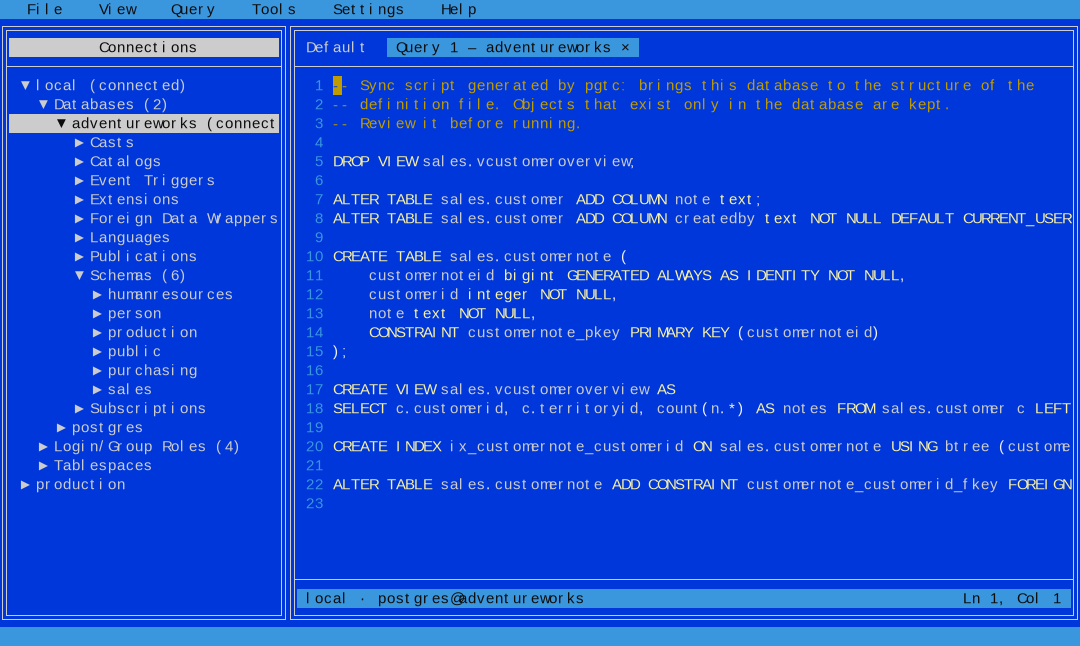
Reading the script
-- Sync script generated by pgtc: brings this database to the structure of the
-- definition file. Objects that exist only in the database are kept.
-- Review it before running.

DROP VIEW sales.vcustomeroverview;

ALTER TABLE sales.customer ADD COLUMN note text;
ALTER TABLE sales.customer ADD COLUMN createdby text NOT NULL DEFAULT CURRENT_USER;

CREATE TABLE sales.customernote (
    customernoteid bigint GENERATED ALWAYS AS IDENTITY NOT NULL,
    customerid integer NOT NULL,
    note text NOT NULL,
    CONSTRAINT customernote_pkey PRIMARY KEY (customernoteid)
);

CREATE VIEW sales.vcustomeroverview AS
SELECT c.customerid, c.territoryid, count(n.*) AS notes FROM sales.customer c LEFT JOIN ...;

CREATE INDEX ix_customernote_customerid ON sales.customernote USING btree (customerid);

ALTER TABLE sales.customernote ADD CONSTRAINT customernote_customerid_fkey
FOREIGN KEY (customerid) REFERENCES sales.customer(customerid);- Only the differences, as minimal statements (
ADD COLUMN, not a re-created table). - Order: schemas; extensions; types, sequences, functions, tables, views and materialized views,
topologically sorted by their normal dependencies in
pg_depend; indexes; foreign keys andOWNED BY; triggers, rules and policies. All foreign keys come after all tables. - Names are schema-qualified and quoted; the script does not depend on
search_path.
Roles, owners and privileges
The script starts with the roles and ends with owners and privileges, each section under its own heading:
| Situation | What the script does |
|---|---|
| A role of the file is not in the target's cluster | CREATE ROLE with its attributes, then the missing memberships (GRANT role TO role). A LOGIN role gets no password: a -- NOTE: says to set one. SUPERUSER is never written; a note says so. |
| The role exists with other attributes | Left as it is (roles are cluster-wide); a -- NOTE: names the attributes. |
| An object's owner differs | ALTER … OWNER TO. A sequence owned by a column follows its table. An object the script creates counts as owned by the role that read the target, so a clone run by that role needs no owner statements. |
| A privilege of the file is missing | GRANT (columns: GRANT p (col)); default privileges: ALTER DEFAULT PRIVILEGES FOR ROLE … GRANT; the database's own: a DO block with current_database(). |
| A privilege exists only in the target | Never revoked: a -- NOTE: for each, to REVOKE by hand if it is not wanted. |
Run the script as a superuser, or as a role with CREATEROLE that is a member of each new owner role
(PostgreSQL 16+: ALTER … OWNER TO needs that); otherwise the server stops it with its error.
The rules of a load
A load creates and alters. It never drops an object that exists only in the database.
| Situation | What the script does |
|---|---|
| Object only in the file | CREATE. |
| Object only in the database | Nothing. |
A column is missing; its type, default or NOT NULL differs | ADD COLUMN / ALTER COLUMN … TYPE … USING column::type (a default is dropped before and set after), SET / DROP DEFAULT, SET / DROP NOT NULL. |
| A property of an existing object is absent in the file (a default, a comment) | Removed: DROP DEFAULT, COMMENT ON … IS NULL. Properties follow the file; only whole objects and parts are kept. |
| An enum lacks labels; a composite type lacks or has different attributes | ALTER TYPE … ADD VALUE IF NOT EXISTS, at the start of the script — a label cannot be used in the transaction that adds it: when the script fails with unsafe use of new value, run these statements on their own first; ADD ATTRIBUTE / ALTER ATTRIBUTE … TYPE. |
| A view or materialized view differs | DROP and CREATE — together with every view that depends on it, also one that exists only in the database (created again as it is there, with its indexes, triggers and rules). Their owners and privileges come from the file. |
| A function differs | CREATE OR REPLACE; DROP and CREATE when the result type, a parameter's name or mode differs or a default is gone. The views that use it are replaced with it; table parts that use it (default, generated column, constraint, index, trigger, rule, policy) are dropped before and created again after — the tables and rows stay. Functions are matched by name and argument types. |
A table inherits (INHERITS) | Created with INHERITS; an existing table gets ALTER TABLE … INHERIT. |
| An identity column's sequence options differ; a column becomes an identity | ALTER COLUMN … SET …; ADD GENERATED … AS IDENTITY and a setval after the rows that are there. |
| A constraint, index, trigger, rule or policy differs | DROP and CREATE. |
| A generated column's expression differs | DROP COLUMN and ADD COLUMN. |
| A column is ordinary on one side, generated on the other | A -- NOTE:; no statement (replacing it would drop its values). |
| A table's partition key differs | The table is re-created, keeping the rows — see below. |
No ALTER can apply the difference (a domain's base type) | A -- NOTE: comment only. |
Re-created tables
Only when the partition key differs. The script:
- copies the table with its rows into
_TableCopy_<name>in the same schema; - drops the table (partitions go with it) and creates it and its partitions as in the file, plus the columns and parts that exist only in the database;
- loads the rows back with
INSERT … OVERRIDING SYSTEM VALUE, advances identity sequences withsetval()and restoresOWNED BY; - ends with a commented-out
-- DROP TABLE sales."_TableCopy_orders";per copy. The script never drops the copies.
What a load cannot know
- Renames. Objects are matched by name: a renamed column is added under the new name and the old one stays. Rename by hand before loading.
- Data. Rows are not examined: a new
NOT NULLcolumn without a default fails on a non-empty table; a type change may needUSING. Edit the script.
Running the script
It is sent as one request and runs as one transaction (see Scripts): a failing statement rolls everything back. To inspect before committing, turn off first.
Example: from development to test
- On the development server's
adventureworks: . - On the test server's
adventureworks: , pick the file. - Review the script, F5. Objects that exist only in test are kept.