SQL files and result export
SQL files in query tabs, the file dialog, and the export of a whole result set as CSV, JSON or XML.
All paths are client-side: the host pgtc runs on — over SSH that is the remote host — never the database server.
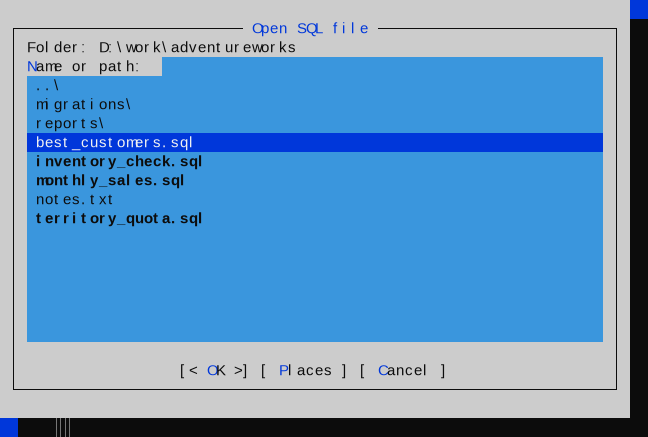
Opening a SQL file
(also in the tree's context menu, F2) loads the file into a new query tab on the database selected in the tree. Nothing is executed. Without a selected database the command is disabled.
- The file must be valid UTF-8 (a BOM is dropped); pgtc converts no encodings. Sessions use
client_encoding = UTF8. - No practical size limit (Large scripts) — but F5 sends the
whole text as one request (Scripts), and psql meta-commands in a dump
(
\connect,COPY … FROM stdindata with\.) are not interpreted.
Saving
- Ctrl+S () writes to the tab's file without a question; a tab without a file gets Save as. In the object tree the key is quick search.
- binds the tab to the new file; it asks before overwriting.
- Written as UTF-8 without BOM — always the whole text, also with a selection.
- Line ends: a file read with CR LF is written with CR LF; any other with LF.
- The write is atomic:
name.tmpin the same folder, flushed, renamed over the target. An existing file keeps its permissions; a symbolic link is followed. Where no temporary file can be created, the file is written in place. - Saving commits nothing; an open transaction is asked about separately when the tab closes (Closing a query tab).
The file dialog
One dialog for all file commands (SQL files, result export, .pgdef), modelled on Midnight
Commander's. OK takes whichever was used last: the selected row or the typed text.
| Typed | Resolved as |
|---|---|
report.sql, reports/q3.sql, ../x.sql | Relative to the listed directory. |
D:\work\x.sql, /home/me/x.sql, \\server\share\x.sql | Absolute. |
~, ~/sql/x.sql | The home directory — also on Windows. |
D: | Windows: the root of drive D. |
- A path that names a directory changes to it.
- pgtc creates no directories and appends no extension when saving.
- The first dialog of a run opens in the user's documents folder, later ones where the last one was; the location is not kept across runs.
- Directories are listed in the background (Reading…), so a slow share does not block the UI.
Places: drives and other starting points
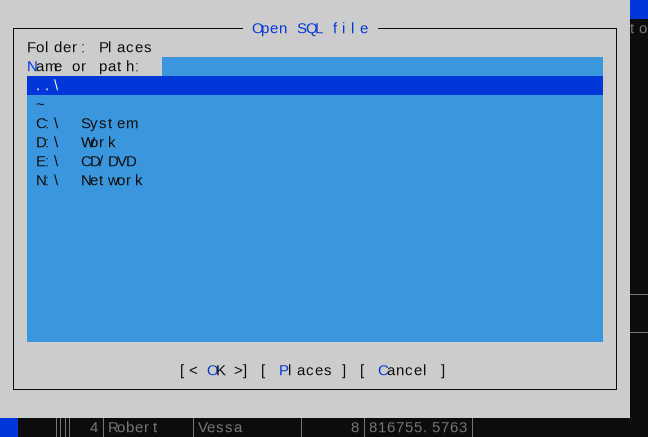
Alt+P (Places) lists: the home directory; the folder of the tab's file;
on Windows every drive with its label; on Linux / and the entries under
/media/<user>, /run/media/<user> and /mnt; on macOS
/ and /Volumes. On Windows, .. in the root of a drive also leads here.
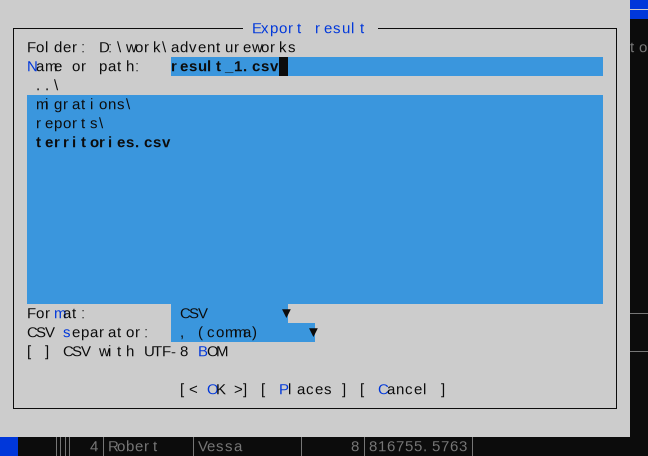
Exporting a result
(or F2 in the grid) writes the selected result set
as CSV, JSON or XML. pgtc writes the rows itself: no COPY, no extra
privileges.
- Every row is exported, not only the fetched batch: pgtc writes the loaded rows, then resumes the paused result and streams the rest directly to the file. The statement is not executed again (same snapshot as the grid) and the rows are not held in memory.
- Afterwards the grid keeps its loaded rows, labelled e.g.
1,000 of 1,234,567 rows (rest exported); the statement has completed on the server. - Alt+Shift+C cancels. A cancelled or failed export removes its incomplete file; a file it could not create (read-only, locked) is left as it is.
- While an export runs, nothing else can be executed in the tab.
- Values are the server's text output (
DateStyle,IntervalStyle,bytea_output,extra_float_digits). - Format, separator and BOM choice are remembered in the settings. The extension follows the format; an existing file is overwritten only after confirmation.
CSV
territoryid,name,countryregioncode,salesytd
1,Northwest,US,7887186.7882
6,Canada,CA,6771829.1376| Property | Written as |
|---|---|
| Header | One line with the column names. |
| Separator | , (default), ; or tab. |
| Quoting | RFC 4180: only fields containing the separator, a double quote or a line break; " is doubled. |
| NULL | An empty field — indistinguishable from an empty string (unlike COPY … CSV). |
| Line ends | CR LF. |
| Encoding | UTF-8; a BOM if CSV with UTF-8 BOM is checked. |
For Excel: check the BOM, and choose ; where the locale's decimal separator is a comma.
JSON
[
  {"territoryid": 1, "name": "Northwest", "countryregioncode": "US", "salesytd": 7887186.7882},
  {"territoryid": 6, "name": "Canada", "countryregioncode": "CA", "salesytd": 6771829.1376}
]
One object per row; the JSON type follows the column's type OID:
| Column type | In JSON |
|---|---|
int2, int4, int8, oid, float4, float8, numeric | A number: the digits of the text output, copied unchanged (full precision in the file). NaN, Infinity, -Infinity are written as strings. |
bool | true / false |
json, jsonb | Embedded as a JSON value. |
| SQL NULL | null |
| Every other type | A string with the text output. |
Duplicate column names are made unique: the second a becomes a_2.
XML
<?xml version="1.0" encoding="UTF-8"?>
<result>
  <columns><column name="territoryid"/><column name="name"/></columns>
  <row><value>1</value><value>Northwest</value></row>
  <row><value>6</value><value null="true"/></row>
</result>- Column names are attributes in
<columns>; each<row>has one<value>per column, in order. All values are text. - SQL NULL is
<value null="true"/>, distinct from<value></value>. - A value with a control character XML 1.0 forbids (U+0001–U+0008, U+000B, U+000C, U+000E–U+001F) is written
base64-encoded and marked
encoding="base64".
Other ways to get data out
- Ctrl+C in the grid (cell), or Ctrl+A then Ctrl+C (loaded rows, tab-separated).
- Server-side
COPY (query) TO 'file'in a query tab;COPY … TO STDOUTis not supported. - The schema of a database, without data: Database definition.